Finding the right machine for cutting vinyl involves balancing speed, precision, material versatility, and software compatibility. This article reviews five popular models that cater to hobbyists and small businesses alike, highlighting what each offers in terms of capacity, control, and workflow. Use the buying guide to compare features and decide which cutter best suits your creative needs.
| Product | Brand | Cutting Width / Capacity | Key Strength |
|---|---|---|---|
| VEVOR Vinyl Cutter 34Inch Bundle | VEVOR | Up to 30.7″ cutting width | LCD display, adjustable pressure, precise movement |
| VEVOR Vinyl Cutter 53 Inch | VEVOR | Up to 49.6″ cutting width | Large format, strong stability, digital control |
| Likcut S41 Vinyl Cutter | LIKCUT | Standard desktop width | Print-then-cut workflow, dual-mode connectivity |
| Cricut Explore 4 – Seashell | Cricut | Supports a wide range of materials | Draws, foils, scores; inkjet Print-Then-Cut compatible |
| Cricut Explore 4 Machine with Vinyl and Iron-On Bundle | Cricut | Versatile with included materials kit | Essential materials bundle; beginner friendly |
VEVOR Vinyl Cutter 34Inch Bundle

The VEVOR 34-inch bundle is designed for sign making and detailed vinyl projects. It offers a maximum paper feed of 870 mm (34.3″) and a cutting width up to 780 mm (30.7″). Precision is rated at +/- 0.01 mm, with paper feed accuracy around 3 meters. The machine includes a D-typed motherboard, 4M cache memory, double spring pinch-rollers, and roughened steel rollers to minimize drift during long runs. Cutting pressure is adjustable from 20 to 500 g, with speed between 20 and 800 mm/s. A backlit LCD display supports intuitive operation, helping operators monitor settings as cuts progress.
This model is broad enough for vehicle decals, signage, and layered graphics. It ships with Signmaster software to streamline design-to-cut workflows, making it a practical option for small studios or home workshops that require reliable performance and easy setup.
VEVOR Vinyl Cutter 53 Inch

The 53-inch VEVOR cutter expands capacity for larger signs and more ambitious graphics. It features a maximum paper feed of 1350 mm (53.1″) and a cutting width up to 1260 mm (49.6″). Precision remains at +/- 0.01 mm with a 3 m feed accuracy. The machine employs an ARM-based motherboard and 4M cache memory for smoother operation, along with double spring pinch-rollers and roughened steel rollers to maintain feed stability across long cuts. Cutting pressure is adjustable from 20 to 500 g and speeds range from 20 to 800 mm/s, with a backlit LCD display for easy monitoring.
Ideal for large decals, vehicle graphics, and wall art, this model suits makers ramping up production without sacrificing accuracy or reliability.
Likcut S41 Vinyl Cutter
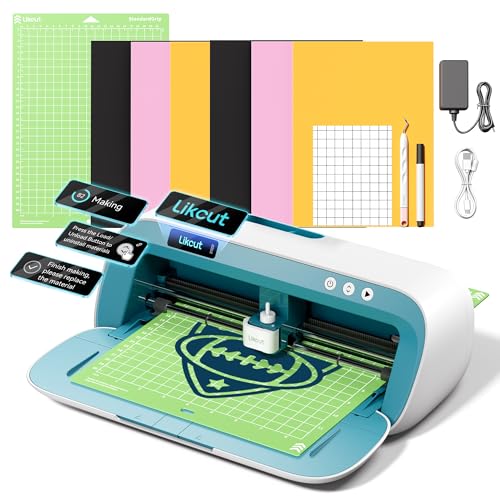
The Likcut S41 emphasizes a streamlined 3-step workflow designed to minimize setup time and maximize creative output. It supports dual-mode connectivity for wired or wireless operation, reducing the risk of mid-cut interruptions. The system emphasizes micro-precision control with an accuracy tolerance around 0.2 mm, and automatic calibration helps maintain cutting path stability across runs. This model is positioned as a strong starter-to-mid-range option for DIY crafters focusing on stickers, room decor, and school projects.
Its user-friendly interface, stable cuts, and flexible connectivity make it suitable for classrooms, home studios, and small craft businesses seeking consistent results without complex software requirements.
LOKLiK Cutting Machine 2 by HTVRONT

LOKLiK Cutting Machine 2 from HTVRONT is a 5-in-1 versatile cutter designed for a broad range of crafts. It supports multiple cutting modes and is compatible with AI painting features for quick design augmentation. The device emphasizes precise and quieter operation, boasting a print-then-cut accuracy down to 0.5 mm. It includes features like deep cutting, scoring, and foil printing (tools sold separately), making it suitable for personalized apparel, home decor, and detailed cardmaking. Its upgraded motor system reduces noise and speeds up project timelines, which is helpful for busy studios and educational settings.
With strong emphasis on multi-functionality and creative expansion, this cutter appeals to users who want a single machine capable of many finishing techniques without changing devices.
Cricut Explore 4 Seashell
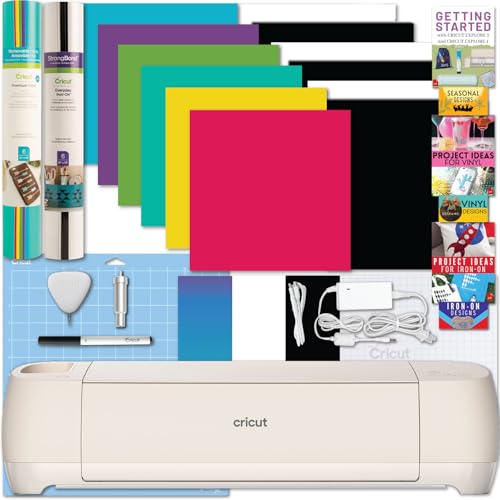
The Cricut Explore 4 Seashell model offers a versatile cutting engine capable of handling a wide range of materials—from vinyl to iron-on and cardstock. It supports drawing, foiling, scoring, and cutting, with compatibility for Print-Then-Cut when paired with inkjet outputs. The bundle includes essential tools and materials to get started, including mats and a digital guide with project tutorials. This setup is particularly appealing to hobbyists and educators who want a robust, user-friendly device with strong software support and a broad material library.
Its design emphasizes adaptability for home decor, decals, and learning projects, while Cricut’s ecosystem provides extensive project ideas and support resources for beginners and advanced users alike.
Cricut Explore 4 Machine with Vinyl Bundle
This Cricut Explore 4 bundle centers on beginner-friendly usability with a materials kit that covers essential vinyl and iron-on options. The box includes a cutting mat, a fine-point blade, a pen, and a mini weeder, along with a digital guide. The kit is designed to help new users learn the workflow—from design to cut—without requiring separate purchases. It also offers Design Space software compatibility for design modifications and easy project sharing, making it a practical choice for families and classrooms exploring DIY decor and apparel projects.
Buying Guide: Key Purchase Considerations
- Cutting capacity and bed size: Choose based on the largest project you anticipate, such as vehicle decals or large wall decals. Larger beds handle bigger signs but may cost more and require more workspace.
- Material compatibility: Verify support for vinyl, heat transfer vinyl (HTV), cardstock, and specialty materials. Some models offer deep cutting or foil options, expanding your creative options.
- Precision and speed: Look for a stable feed mechanism and a precise tolerance (often ~0.01 mm for high accuracy). Speed should balance throughput with cut quality for your typical projects.
- Software and workflow: Software like Signmaster, Cricut Design Space, or bundled apps influence ease of use. Consider whether you prefer aPrint-Then-Cut workflow or direct cutting from design software.
- Connectivity and reliability: Dual-mode connectivity (wired and wireless) reduces interruptions. Backlit LCDs and intuitive controls help with on-the-fly adjustments during sessions.
- Maintenance and support: Check for service options, replacement parts, and user communities. A growing ecosystem of materials and tutorials adds long-term value.
- Budget and scalability: For beginners, start with a user-friendly model that includes essential materials. For expanding studios, prioritize larger format capabilities and software compatibility.
When choosing, align the machine’s strengths with your typical output—signage, decals, customized apparel, or classroom projects. Consider whether you value large-format capacity, multi-tool versatility, or a strong app ecosystem for rapid design-to-cut workflows.