Soldering is a foundational skill for electronics repair, hobby projects, and DIY electronics. The right beginner soldering iron kit can make learning easier, safer, and more enjoyable. This guide highlights five beginner-friendly kits with features like adjustable temperature, quick heat-up, safety sleep modes, and complete starter accessories. Each entry includes key specs to help you compare options and choose a kit that fits your first projects and budget.
| Product | Brand | Keys To Know |
|---|---|---|
| YIHUA 926 III 60W Digital Display Soldering Station Kit | YIHUA | Fast heat, wide range, PID stabilization, sleep mode, calibration |
| Soldering Iron Kit, 60W with 5 Tips by Q-MING | Q-MING | Thermostatic control, quick heat, energy-saving on/off, complete tips |
| Soldering Iron Kit, 80W LCD Digital by Q-MING | Q-MING | 80W power, quick heating, clear display, good heat dissipation |
| Soldering Iron Premium Kit 60W by MEAKEST | MEAKEST | Six vents, adjustable 200–450°C, safe handling, versatile tips |
| Plusivo Soldering Iron Kit 60W 120V 5‑in‑1 | Plusivo | LED display, 392–932°F range, 5-in-1 kit, handy for beginners |
YIHUA 926 III 60W Digital Display Kit
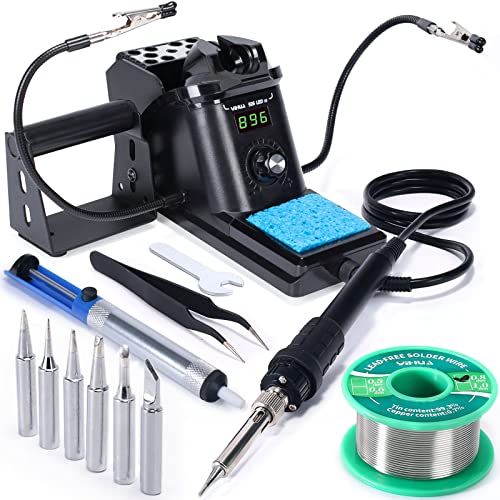
The YIHUA 926 III kit pairs a compact soldering station with a 60W iron and a practical range of temperature settings. It supports wide temperature control (194℉ to 896℉) and features PID stabilization to keep the iron at the set temperature. The station includes a digital display, a master control knob, and an auto sleep function to extend tip life. An integrated iron holder and rear mesh protector help reduce accidental contact, making it suitable for beginners who value safety and organization in a small workspace.
Soldering Iron Kit, 60W by Q-MING

This 60W, 110V pencil-style soldering iron from Q-MING emphasizes a balance between performance and simplicity. It offers adjustable temperatures within a safe range and an on/off switch to conserve energy. The kit includes a basic stand, a set of five interchangeable tips, solder wire, and flux paste, providing a complete starter package for first-time users embarking on electronics repair or hobby projects. Five tips support common tasks like delicate component work and larger joints, making it a versatile entry option.
Soldering Iron Kit, 80W with LCD by Q-MING

This 80W soldering iron features a clear LCD display to read temperatures precisely, a hot yet efficient ceramic heater, and a compact design with good heat dissipation. The included 5 tips and accessories provide a solid starter setup for electronics assembly and repairs. A robust handle and ventilated tip design help keep the tool cooler during longer sessions, which is beneficial for beginners practicing soldering technique and joint cleanliness.
Soldering Iron Premium Kit by MEAKEST

The MEAKEST premium kit emphasizes safety and efficiency with six air vents to prevent overheating and an adjustable 200–450°C range. The kit includes a variety of tips, solder wire, and flux paste, making it a flexible choice for beginners working on electronics, watches, guitars, and small devices. The on/off control adds energy savings and reduces unnecessary heat exposure during non-use periods, which helps extend tip life for new learners.
Plusivo 60W 5-in-1 Soldering Kit

The Plusivo 60W 120V kit offers a 5-in-1 setup with a clear LED digital display and a temperature range from 392 ℉ to 932 ℉ (200–500 ℃). It includes a solder wire, flux paste, stand, sponge, and an eBook guide, aimed at beginners who want a compact, all-in-one solution. The build emphasizes quick heating, efficient heat dissipation through ventilation, and a comfortable, heat-resistant grip for longer projects. The kit is designed to be plug-and-use, reducing setup friction for new users.
Buying Guide: Key Considerations for Beginners
- Power and temperature range: For most electronics work, 60–80W with a broad temperature range (roughly 180–480°C, or 356–896°F) covers typical soldering needs. A stable temperature (PID) helps maintain consistent joints.
- Display and control: A digital display simplifies selecting and monitoring temperature. A single control knob or easy buttons makes adjustments intuitive for new users.
- Safety features: Look for sleep/auto-off modes to extend tip life and reduce burn risk. An integrated stand with a tip storage area and heat-resistant grip improves safety and ergonomics.
- Tips and accessories: A starter kit that includes multiple tips, solder wire, flux paste, paste, and a stand reduces immediate additional purchases and helps you experiment with different joints.
- Maintenance and longevity: Ventilation, anti-slip handles, and protective features (like a mesh shield) help prevent overheating and prolong the tool’s life during practice sessions.
- Space and usability: For beginners, a compact station that combines a soldering iron with a stand and tip storage saves desk space and reduces clutter.
- Product support and safety standards: Kits that reference UL or safety certifications add a level of assurance, particularly for those new to electronics work.
In selecting a beginner kit, consider your intended projects, workspace constraints, and how much you value features like a digital display, sleep mode, and included accessories. The five kits above provide a range of options from compact pencil irons to complete stations with extra hands and tips, helping new users start with confidence and safety.